What is AI Photo Editing and Why It Matters?

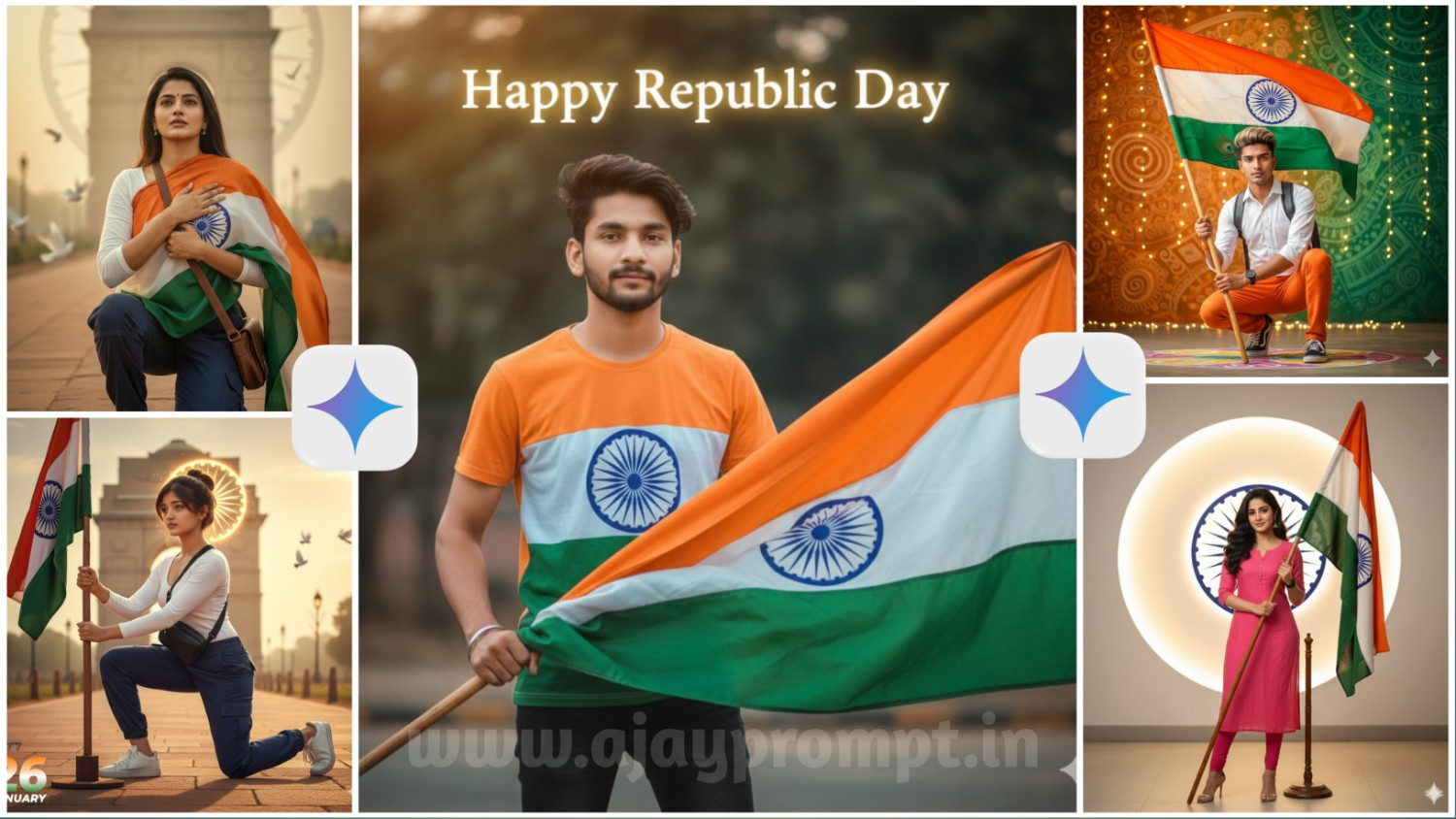
Give me exact face A medium shot of a young Indian man with the exact same face, highly detailed 8K ultra-realistic image. wearing an Indian flag–printed shirt with black jeans. He is gently holding an Indian national big flag in his right hand. The scene is set outdoors,. Warm, glowing cinematic lighting. In the background, glowing text reads: “Happy Republic Day”. Ultra-sharp focus, natural skin texture, realistic colors, professional photography, shallow depth of field.

Without changing my facial features A woman is wearing pink kurta and lagging, black watch, his long b volumnes thik hairs makeup cute smile styled.A woman holding a flag stand Create a behind a Indian flag with stand. And create a behind the him andu it's brighting it's colour is off white. And it's look like professional studio Ashok o chkr logo.

A powerful, ultra-realistic portrait of a confident Indian woman standing in front of the Ashoka Pillar emblem, wearing a fitted white kurti. The Indian tricolor flag is draped over hiso shoulders like a shawl, with the., flag wrapping naturally around his body and resting over one shoulder. His hands are calmly is tilted slightly upwards, as if in deep prayer or expressing gratitude to God.

Action": "image_generation","action_input": "{ "prompt": "A high-quality, vibrant Indian Republic Day portrait. A young man with light, styled hair and a small peacock feather accent tucked behind his ear. He is wearing a crisp white long-sleeved shirt, orange pants, and black and white sneakers. He is in a confident crouching pose, holding a pole with the Indian national flag. He has a black backpack strap across his chest. The background is a creative fusion of saffron.
Ultra-realistic emotional patriotic portrait of the uploaded Indian woman kneeling on one knee, gently holding the Indian tricolor flag close to her chest. Outfit: white long-sleeve top, navy blue cargo pants, sneakers, sling bag. India Gate in the distance with a faded Ashoka Chakra blended into the sky. Soft sunrise golden light, warm tones, cinematic haze, shallow depth of field, realistic skin pores, 8K DSLR quality. White doves flying slowly. Subtle film grain.Small "ajayroy".

Ultra-realistic patriotic portrait of the uploaded Indian woman in a powerful half-kneeling pose, holding the Indian tricolor flag firmly planted on the ground.Wearing a white fitted full-sleeve top, navy blue tactical cargo pants, clean white sneakers, and a cross-body sling bag. Camera angle slightly low for heroic dominance. India Gate softly blurred in the background with a subtle Ashoka Chakra light texture behind her head. Warm golden-hour cinematic lighting, shallow depth of field, crispskin texture, ultra-sharp focus, 8K DSLR realism. Minimal flying doves. Clean composition. Small “@ajayroy” signature in the bottom-left corner. Large bold “26” in tricolor gradient, “JANUARY” below in modern sans-serif with soft motion blur.
Why Use AI for Republic Day Instagram Content?
- Viral Potential और Engagement:- AI generated unique content regular photos से ज्यादा attention grab करता है। Instagram algorithm fresh और engaging content को prioritize करता है, और AI photos अक्सर इस category में fit होते हैं।
- Time और Resource Efficiency:- Traditional photoshoot में location scouting, costume arrangement, photographer booking, और editing – सब में days लग जाते हैं। AI tools यह सब कुछ minutes में कर देते हैं। आप एक evening में multiple variations create कर सकते हैं।
- Unlimited Creative Freedom:- Reality में जो impossible या impractical है, वो AI में possible है। आप खुद को Republic Day parade में march करते, fighter jet pilot बने, या Taj Mahal के सामने traditional attire में visualize कर सकते हैं।
- Cost-Effective Solution:- Professional photography sessions ₹5,000 से ₹50,000 तक cost कर सकते हैं। AI tools में से कई completely free हैं, और paid versions भी monthly ₹500-1000 के बीच आते हैं।
- Perfect for Experimentation:- आप different styles, poses, backgrounds, और themes आसानी से try कर सकते हैं बिना किसी extra cost के। जो version सबसे अच्छा लगे, वो post करें।
Full Details Guide to Create Viral Republic Day Photos
Step 1: Choose Your AI Platform
- सबसे पहले decide करें कि आप कौन सा AI tool use करेंगे। Beginners के लिए Bing Image Creator (Microsoft Designer) best है क्योंकि यह free, fast, और user-friendly है। Google Gemini भी excellent option है।
Step 2: Understand Your Vision
- अपने mind में clear picture रखें कि आप क्या create करना चाहते हैं। किस style में? Traditional या modern? किस location पर? क्या mood है? यह clarity better prompts लिखने में मदद करेगी।
Step 3: Research Trending Styles
- Instagram पर #RepublicDay और #RepublicDay2026 hashtags देखें। Check करें कि कौन से types के photos सबसे ज्यादा engagement पा रहे हैं। इससे आपको current trends का idea मिलेगा।
Step 4: Write Your Prompt
- एक effective prompt तीन main parts में होना चाहिए:
- Subject Description: “Indian girl in tricolor saree”
- Action/Pose: “holding flag, confident pose”
- Environment & Style: “India Gate background, golden hour lighting, professional photography”
Step 5: Generate Multiple Variations
- एक ही prompt से 3-4 variations generate करें। फिर prompt में minor changes करके और variations try करें। आपको कम से कम 10-15 options create करने चाहिए।
Step 6: Select Good Output
- सभी generated images को compare करें। जो सबसे natural, aesthetically pleasing, और error-free हो, उसे select करें। Face, hands, और text (अगर है) को carefully check करें।
Step 7: Post Processing
- Selected image को किसी photo editing app (Snapseed, Lightroom Mobile, या Canva) में open करें। Brightness, contrast, और saturation को slightly adjust करें। Instagram filters avoid करें natural look ज्यादा authentic लगता है।
Step 8: Add Captions and Context
- अपनी photo के साथ एक meaningful caption लिखें जो patriotic sentiment express करे। Generic न हो personal touch add करें। 2-3 relevant hashtags use करें।
Step 9: Optimal Timing
- Republic Day content 23rd January से post करना start करें। Peak engagement 25th January evening और 26th January morning को होता है। अपनी best photos इन times के लिए save करें।
Step 10: Engage with Audience
- Post करने के बाद पहले घंटे में actively respond करें comments को। यह engagement Instagram algorithm को signal देता है कि आपकी content valuable है।
Step 11: Cross Platform Sharing
- अपनी AI created photos को Facebook, WhatsApp Status, और Twitter पर भी share करें। Multiple platforms पर presence आपकी reach बढ़ाती है।
Ethical Considerations और Best Practices
Respecting Privacy और Consent
Family Member Consent
AI-generated photos में भी consent important है:
जब Real Photos को Reference के रूप में Use करें:
- सभी visible family members की permission लें
- Especially important अगर children हैं
- Elderly members को clearly explain करें कि यह AI-generated है
- कोई uncomfortable feel करे तो respect करें
Social Media Sharing:
- पूछें कि क्या सब comfortable हैं public posting से
- Privacy settings discuss करें
- किसी को tag न करें without permission
- Children की photos के साथ extra cautious
Commercial Use:
- अगर आप photos को business purposes के लिए use कर रहे हैं
- Clear consent लें in writing
- Compensation discuss करें अगर appropriate हो
Republic Day Simple AI Gemini – (FAQ)
Conclusion
Republic Day एक गर्व और उत्साह का पर्व है और AI technology ने इसे celebrate करने के तरीके को और भी creative बना दिया है। Google Gemini और similar AI tools की मदद से अब कोई भी व्यक्ति professional-quality patriotic photos create कर सकता है। इन prompts का सही तरीके से इस्तेमाल करके आप अपनी Instagram profile को unique बना सकते हैं। याद रखें कि creativity के साथ-साथ national symbols के प्रति respect भी जरूरी है। इस Republic Day, technology और patriotism को combine करके कुछ नया और inspiring create करें। Happy Republic Day.